
Website CRM Integration Services for UK Businesses
Connect your website to your CRM and make it easier to manage enquiries, customer information and sales follow-ups.
Your website may already be generating enquiries.
Customers fill in contact forms, request quotes, book consultations or ask questions about your services.
But what happens after someone submits their details?
If enquiries arrive in an email inbox and someone has to copy the information into your CRM manually, it's easy for work to pile up.
A message might be missed.
A lead might be assigned to the wrong person.
Or your sales team may spend unnecessary time moving information between systems.
At DOT IT, we help UK businesses connect their websites with customer relationship management (CRM) systems.
We work with website forms, lead capture processes, CRM integrations and suitable automation tools to help information move between your website and the systems your team uses.
Whether you use HubSpot, Salesforce, Zoho CRM, Pipedrive or another CRM, we can review your requirements and discuss a suitable integration.
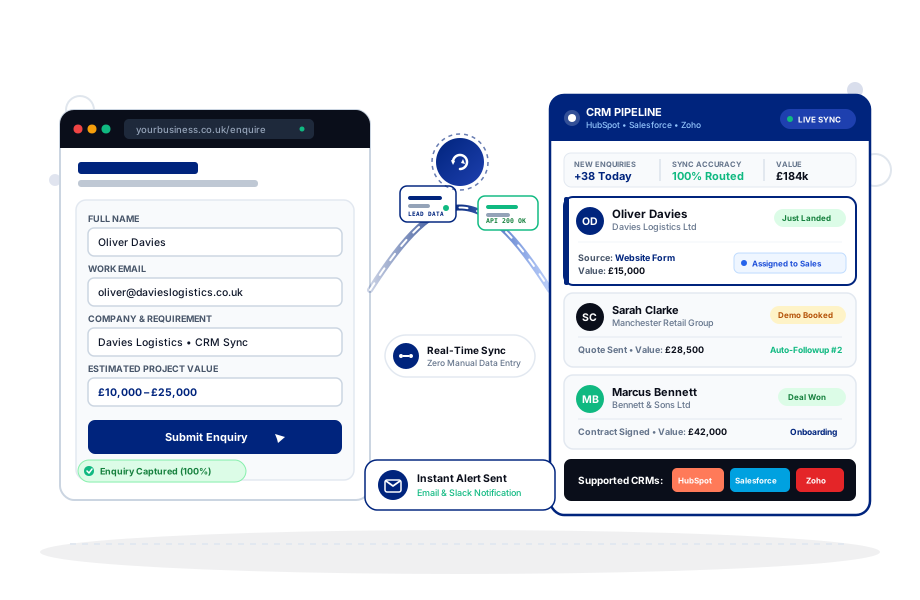
Make Your Website and CRM Work Together
Your website is often where a customer first contacts your business.
Your CRM is where your team may manage the relationship after that initial enquiry.
Connecting the two can make the process more organised.
For example, when someone submits a quote request, their information may be sent to your CRM automatically.
Depending on your setup, the system may create a new contact, update an existing record, notify a team member or assign the enquiry to a particular sales pipeline.
This can reduce repetitive administration.
It can also make it easier for your team to find relevant information when following up with potential customers.
The right setup depends on how your business handles enquiries.
Some businesses only need contact form submissions sent to a CRM.
Others need multiple forms, different lead categories, sales assignments and more detailed workflows.
We start by understanding your current process before recommending an integration.
Our Website CRM Integration Services
We help businesses connect websites, enquiry forms and customer management systems.
Website Contact Form CRM Integration
Connect website contact forms to a suitable CRM so enquiries can be recorded without manual copying.
HubSpot Website Integration
We can discuss connecting website forms and lead capture processes with HubSpot.
Salesforce Website Integration
We help review requirements for sending website enquiries and relevant information into Salesforce.
Zoho CRM Website Integration
Connect suitable website forms and workflows with Zoho CRM.
Pipedrive Website Integration
We can discuss creating contacts, leads or deals from website enquiries using supported integration methods.
WordPress CRM Integration
Connect WordPress forms and website functionality with suitable CRM platforms.
Wix CRM Integration
We can review CRM integration options for Wix and Wix Studio websites.
Shopify CRM Integration
We can discuss supported integrations involving ecommerce customer information and CRM systems.
Custom CRM API Integration
For more specific requirements, we can review API-based integration options.
Lead Routing and Automation
We can discuss suitable rules for assigning, categorising and notifying teams about new enquiries.
Existing CRM Integration Troubleshooting
If an existing integration isn't working properly, we can investigate the issue.
Website Contact Form to CRM Integration
A contact form is often the starting point for a customer enquiry.
Visitors may use it to ask about pricing, request a consultation or explain what they need.
Without an integration, the information may only arrive by email.
Your team then has to record the details elsewhere.
A CRM integration can help make that process more efficient.
Capture Enquiry Details
Relevant form fields can be mapped to CRM fields.
Create Contact Records
New enquiries may create contacts or leads in your CRM.
Update Existing Contacts
Depending on the CRM and integration rules, existing records may be updated.
Record Enquiry Sources
Where available and appropriately configured, information about the enquiry source can be passed to your CRM.
Notify Your Team
New enquiries may trigger suitable notifications.
Categorise Enquiries
Different forms may send leads into different categories or pipelines.
Reduce Duplicate Records
Supported matching and validation rules may help limit unnecessary duplicates.
We consider the information your business actually needs rather than adding unnecessary form fields.
HubSpot Website Integration
HubSpot is used by businesses to manage contacts, marketing activities and sales processes.
If your website isn't connected to HubSpot, your team may be handling information manually.
We can discuss integration options based on your website platform and HubSpot setup.
Potential requirements include:
Potential Requirements
- Website enquiry forms
- Contact creation
- Existing contact updates
- Lead source information
- Sales notifications
- Pipeline-related workflows
- Meeting booking integrations
- Relevant marketing consent information
HubSpot Forms
In some cases, HubSpot's own forms may be suitable.
Existing Website Forms
Other projects may require connecting existing forms using supported integrations or APIs.
Custom Field Mapping
Information collected on the website may need to match the properties configured in HubSpot.
Workflow Considerations
Some automation capabilities depend on your HubSpot subscription and configuration.
We review the requirements before recommending an approach.
Salesforce Website Integration
Salesforce can support complex customer and sales management processes.
Businesses using Salesforce may need website enquiries to reach the correct records, teams or workflows.
We can review integration requirements involving:
Integration Requirements
- Lead creation
- Contact information
- Enquiry details
- Custom fields
- Sales assignments
- Form submissions
- Supported API connections
- Integration error handling
Salesforce Web-to-Lead
For suitable use cases, Salesforce's supported lead capture features may provide a straightforward approach.
API-Based Integration
More tailored requirements may need API access and additional development.
Field Mapping
Website information should be mapped appropriately to the CRM's data structure.
Access and Permissions
Integrations may require suitable permissions and authentication.
Salesforce environments can be highly customised, so we review the existing setup before defining the work.
Zoho CRM Website Integration
Zoho CRM can help businesses organise leads, contacts and sales activities.
If your website receives regular enquiries, an integration may help reduce manual data entry.
We can discuss:
Review Areas
- Contact form connections
- Lead creation
- Field mapping
- Enquiry categorisation
- Sales notifications
- Supported workflow triggers
- Custom integration requirements
Connecting Existing Forms
We review whether your current website forms can connect through supported methods.
Custom Fields
If your business collects specific information, the CRM may need appropriate field configuration.
Lead Assignment
Depending on the setup, new enquiries may be assigned to the relevant team or salesperson.
Integration Testing
We review the agreed data flow to check that information is reaching the intended destination.
Pipedrive Website Integration
Pipedrive is commonly used by sales teams to manage leads, contacts and deals.
A website integration can help move new enquiries into the sales process.
We can discuss:
Review Areas
- Website form submissions
- Lead creation
- Contact records
- Deal creation
- Pipeline assignment
- Lead source information
- Notifications
- Custom fields
- Supported automation
Quote Request Forms
Businesses receiving quote requests may want those enquiries recorded in Pipedrive.
Consultation Enquiries
Consultation requests may need to be associated with particular sales activities.
Multiple Service Enquiries
Different services may require different categorisation or assignment rules.
Existing Integrations
If your current connection is unreliable, we can review the problem and discuss suitable fixes.
WordPress CRM Integration
WordPress websites often use contact forms, quote request forms and booking tools to collect customer information.
We can help review ways to connect those systems with your CRM.
WordPress Contact Forms
Supported form plugins may offer direct CRM integrations.
Custom WordPress Forms
Some websites require tailored integration development.
API Connections
Depending on the CRM and website setup, an API connection may be appropriate.
Lead Source Tracking
Relevant source information may be included where supported and configured appropriately.
Form Validation
We consider whether required information is being collected correctly.
Error Handling
The integration should have an appropriate way to handle failed submissions or connection problems.
Existing WordPress Websites
You don't necessarily need a new website to introduce CRM functionality.
We can review your current WordPress setup first.
Wix and Wix Studio CRM Integration
Wix includes its own customer and contact management features.
However, some businesses prefer to use an external CRM.
We can review supported integration options for Wix and Wix Studio websites.
These may involve:
Review Areas
- Website forms
- Contact information
- Wix Automations
- Supported third-party integrations
- Velo development
- External APIs
- Booking-related enquiries
- Custom workflows
Wix Automations
For some requirements, supported automation features may provide a practical solution.
Velo Integrations
More tailored requirements may involve custom development using Wix's supported APIs and Velo capabilities.
External CRM Connections
We can review suitable methods for connecting Wix with your existing CRM.
The available options depend on your Wix setup, subscription and the external CRM.
Shopify CRM Integration
Shopify businesses may use CRM systems to manage customer relationships, sales enquiries and other business processes.
However, ecommerce integrations can be more complex than standard contact form connections.
You may need to consider customer records, orders, marketing permissions and other information.
We can discuss suitable Shopify CRM integrations involving:
Integration Features
- Customer information
- Enquiry forms
- Relevant order data
- Customer support workflows
- Sales team notifications
- Supported CRM applications
- API-based connections
Customer Data
Only relevant information should be transferred between systems.
Order Information
Where required, supported integrations may provide order-related information to the CRM.
Marketing Permissions
Consent and communication preferences should be handled appropriately.
Platform Capabilities
Shopify and CRM providers may restrict certain integration features.
We review the available options before confirming the scope.
CRM Integration for Custom Websites
Not every business uses WordPress, Wix or Shopify.
Your website may be built with Next.js, React or another custom development framework.
Custom websites may require API-based connections with CRM systems.
We can discuss integrations involving:
Custom Contact Forms
Send relevant enquiry information to a CRM.
API Authentication
Use suitable authentication methods supported by the CRM provider.
Field Mapping
Connect website fields with CRM properties.
Data Validation
Check relevant information before processing it.
Error Handling
Identify failed requests and support appropriate recovery processes.
Duplicate Handling
Apply supported rules to reduce unnecessary duplicate records.
Custom Workflows
Trigger agreed actions when certain types of enquiries are received.
Testing
Review the integration using suitable test scenarios.
Custom integration requirements should be assessed before development begins.
Automated Lead Routing
Not every enquiry should go to the same person.
A business offering several services may need different teams to handle different types of leads.
For example, a company may want website development enquiries sent to one team and marketing enquiries sent to another.
CRM integration can support lead routing where the platform and workflow allow it.
Service-Based Routing
Assign enquiries according to the service selected.
Location-Based Routing
Some businesses may need leads assigned according to the customer's location.
Team Notifications
Notify relevant team members when new enquiries arrive.
Sales Pipeline Assignment
Different enquiry types may enter different CRM pipelines.
Priority Rules
Some organisations may need rules for identifying urgent or high-priority requests.
Follow-Up Tasks
Supported workflows may create tasks for the relevant team.
We help discuss rules that reflect how your business operates.
Automation should support your sales process rather than make it unnecessarily complicated.
CRM Integration With Booking Websites
If customers book appointments through your website, you may want relevant booking information available in your CRM.
This can help your team understand who has booked and what service they requested.
Depending on the systems involved, possible features include:
Possible Features
- Contact creation
- Booking-related information
- Appointment notifications
- Lead categorisation
- Consultation follow-up tasks
- Relevant customer history
Booking Platform Integration
Some booking platforms offer direct CRM connections.
Custom Booking Systems
Custom booking software may require API development.
Avoiding Duplicate Information
Appropriate matching rules may help keep CRM records organised.
Managing Changes
Rescheduled or cancelled appointments may need to update relevant records.
We review the capabilities of both systems before recommending a solution.
CRM Integration With Email Marketing
Some businesses want website enquiries to connect with email marketing systems.
For example, someone may request a guide, subscribe to updates or ask for information about a service.
The appropriate process depends on the purpose of the form and the permissions collected.
We can discuss:
Newsletter subscription forms
Capture subscribers directly from dedicated forms.
Supported CRM and email marketing connections
Link marketing tools with your core customer database.
Contact list organisation
Organise contacts into suitable segments and audiences.
Relevant consent information
Record opt-in details and permissions accurately.
Contact preferences
Respect communication channels and topic interests.
Supported automated messages
Trigger relevant follow-ups and notifications automatically.
Consent Matters
Submitting a contact form does not automatically mean someone has agreed to receive marketing emails.
Your business needs an appropriate lawful basis and must comply with applicable data protection and electronic marketing requirements.
We can help implement agreed technical requirements, but legal advice should come from a qualified professional.
Website Lead Tracking and CRM Data
Businesses often want to understand which website enquiries come from different marketing channels.
For example, you may want to distinguish enquiries from organic search, paid advertising or referral campaigns.
Depending on your website, analytics configuration and CRM capabilities, relevant information may be passed into the CRM.
Form Source
Identify which form generated the enquiry.
Landing Page
Record the page associated with a submission where supported.
Campaign Information
Relevant campaign parameters may be included when available.
Service Interest
Forms can capture which service the visitor is interested in.
Lead Status
Your sales team may update the CRM as enquiries progress.
Reporting
CRM reports may help your business understand the status of captured leads.
Not every integration supports every type of tracking.
We review the available data and the requirements before recommending implementation.
CRM Integration and Data Security
Connecting a website to a CRM involves transferring information between systems.
That information may include names, email addresses, telephone numbers and other customer details.
The integration should be designed with appropriate security considerations.
Secure Connections
APIs and data transfers should use suitable secure methods.
Authentication
Integration credentials should be handled appropriately.
Access Permissions
Connections should use permissions suitable for the required functionality.
Data Minimisation
Only relevant information should be collected and transferred.
Error Handling
Integration failures should be managed without unnecessarily exposing customer information.
Third-Party Providers
The security and data handling practices of external services also matter.
UK Data Protection Requirements
UK GDPR and the Data Protection Act 2018 may apply to personal data processed through your website and CRM.
Depending on your setup, other requirements may also apply.
We provide technical integration and development services rather than legal compliance advice.
Common Website CRM Integration Problems
Businesses sometimes contact us because an existing integration has stopped working or isn't behaving as expected.
Problems can include:
Website Leads Not Appearing in the CRM
Form submissions may be failing or not reaching the intended destination.
Missing Information
Some fields may not be mapped correctly.
Duplicate Contacts
The integration may create new records instead of matching existing ones.
Incorrect Lead Assignment
Enquiries may be sent to the wrong team or pipeline.
Authentication Errors
API credentials or permissions may need attention.
Integration Failures After Updates
Website changes or third-party platform updates can affect existing connections.
Delayed Information
Some integrations may process data asynchronously or depend on external services.
Inconsistent Form Behaviour
Different forms may use different integration settings.
We investigate the relevant setup before recommending fixes.
Do You Need a New Website for CRM Integration?
Usually, no.
If your existing website works well, it may be possible to connect it to your CRM without rebuilding it.
The available options depend on the platform and the functionality required.
When an Integration May Be Enough
- Your current website meets your business needs
- Your forms collect the required information
- Your CRM supports a suitable connection
- The existing setup can accommodate the integration
When Additional Website Development May Be Needed
- Your forms need substantial changes
- The current platform cannot support the required workflow
- Custom functionality is needed
- The website has broader technical problems
- The enquiry process needs redesigning
We'll review the existing website before recommending a larger development project.
How Much Does Website CRM Integration Cost in the UK?
The cost depends on the systems involved and the complexity of the integration.
Connecting a straightforward contact form through a supported integration has a different scope from developing a custom API connection with multiple workflows.
Factors affecting the price include:
- Website platform
- CRM provider
- Number of forms
- Required CRM fields
- Lead routing rules
- Existing CRM configuration
- API requirements
- Custom development
- Third-party automation tools
- Testing requirements
- Error handling
- Ongoing support needs
At DOT IT, CRM integration projects are quoted according to their requirements.
You may also need subscriptions for your CRM, automation platform or other third-party services.
These costs are separate unless included in the agreed quotation.
Ongoing maintenance and support are quoted separately.
Our Website CRM Integration Process
We start by understanding your existing website and sales process.
Review Your Website
We look at the forms and other ways customers currently contact your business.
Understand Your CRM
We discuss which CRM you use and how your team manages leads.
Define the Data Flow
We identify which information needs to move between systems.
Choose the Integration Approach
We discuss supported native integrations, automation platforms or custom development.
Configure and Develop
We implement the agreed integration.
Test Form Submissions
We check relevant test scenarios and field mapping.
Review Error Handling
Where appropriate, we consider how failures can be identified and addressed.
Handover and Support
We explain the agreed setup and discuss any ongoing maintenance requirements.
Why Choose DOT IT for Website CRM Integration?
We Understand Website Development
We work with WordPress, Wix, Shopify, Webflow, Framer and custom website technologies.
We Start With Your Business Process
We discuss how your team manages enquiries before recommending automation.
We Consider Existing Systems
You don't necessarily need to replace your website or CRM.
We Support Different Integration Approaches
We can discuss native integrations, suitable automation platforms and custom API development.
We Keep Workflows Practical
The aim is to reduce unnecessary manual work, not introduce complexity for its own sake.
We Explain Technical Requirements Clearly
We outline what needs to be connected and any relevant limitations.
We Can Help With Further Website Development
If your forms or website need additional changes, we can discuss those requirements separately.
What Our Clients Say
Hear from businesses that trust DOT IT to power their growth.
Sayyid Aliraza Naqvi
Website, Branding
Gazi Varteji
Website Design, Devlopment
Thanushan
UI/UX, Web Devlopment
Leah Zimmerman
Website Devlopment
Robert
Website Devlopment
Kelly Roberts
Website + Lead Genration
Samrendra Srivastava
Video Creation
Sayyid Aliraza Naqvi
Website, Branding
Gazi Varteji
Website Design, Devlopment
Thanushan
UI/UX, Web Devlopment
Leah Zimmerman
Website Devlopment
Robert
Website Devlopment
Kelly Roberts
Website + Lead Genration
Samrendra Srivastava
Video Creation
Sayyid Aliraza Naqvi
Website, Branding
Gazi Varteji
Website Design, Devlopment
Thanushan
UI/UX, Web Devlopment
Leah Zimmerman
Website Devlopment
Robert
Website Devlopment
Kelly Roberts
Website + Lead Genration
Samrendra Srivastava
Video Creation
Frequently Asked Questions About Website CRM Integration
Connect Your Website to Your CRM
If your team is spending time copying website enquiries into a CRM, or your existing integration isn't working properly, we can help you review the options.
Tell us which website platform and CRM you use.
We'll discuss the information you need to capture, how your team handles enquiries and what an appropriate integration could look like.
Website CRM integration, lead capture automation and custom website development services for UK businesses.